
Components Overview
SilverHawk components reside in the Grasshopper ribbon under the dedicated SilverHawk tab, organized into three functional panels:
| Panel | Component | Purpose |
|---|---|---|
| 1. Solver | SH_Solver | The core optimization engine and GUI interface. |
| 2. Utility | SH_Objective | Explicit direction (MIN/MAX) and optional weight wrapper for fitness values. |
| 2. Utility | SH_SlidersUnBias | Randomizes slider values within their bounds to prevent starting point bias. |
| 3. Benchmark | SH_BenchmarkSO | Standard synthetic single-objective test functions (Sphere, Rastrigin, Rosenbrock, etc.). |
| 3. Benchmark | SH_BenchmarkMO | Multi-objective synthetic benchmarks (ZDT suite: ZDT1–4 and ZDT6). |
| 3. Benchmark | SH_BenchmarkADO | The architectural 22-variable daylight and energy benchmark dataset. |
The Complete Component Suite
The six SilverHawk components shown in true relative scale on the Grasshopper canvas:
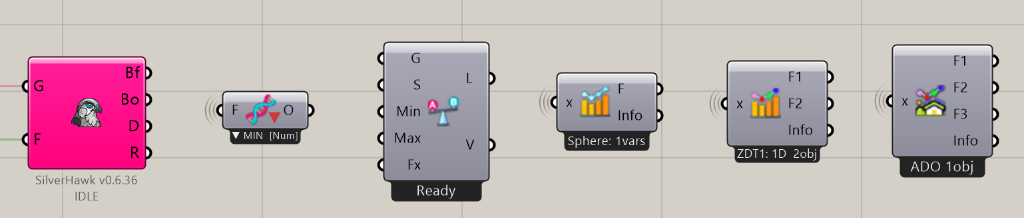
Figure 1: Complete SilverHawk v0.6.36 suite in true canvas proportions (from left to right: SH_Solver, SH_Objective, SH_SlidersUnBias, SH_BenchmarkSO, SH_BenchmarkMO, and SH_BenchmarkADO).
Visual Wiring Workflow
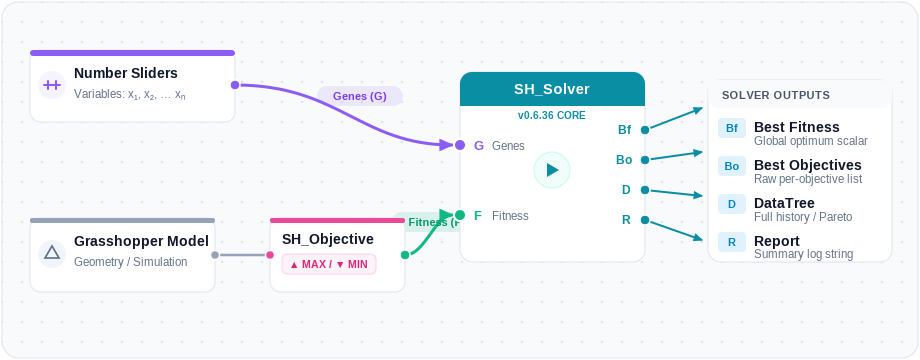
Figure 2: SilverHawk v0.6.36 visual wiring architecture on the Grasshopper canvas: inputs flow from decision variables (Number Sliders / Genes) into G, and evaluated geometry metrics pass through SH_Objective into F. Outputs Bf, Bo, D, and R feed directly back to downstream components.
- Genes (G): Wire all decision variables (Number Sliders) to the solver's
Ginput. - Fitness (F): Evaluate your model and pass the resulting numerical metrics through
SH_Objectiveinto the solver'sFinput. - Execution: Double-click
SH_Solverto configure settings, select the algorithm, and run the optimization.