
SH_Objective
The SH_Objective component tags one or more fitness values with an optimization direction (Minimize or Maximize) and an optional weight, passing them through (
The label under the component displays the active direction and the connected values, for example ▼ MIN [F1, F2] or ▲ MAX [F3]. Several SH_Objective components can be wired to the same solver input, enabling mixed multi-objective optimization.
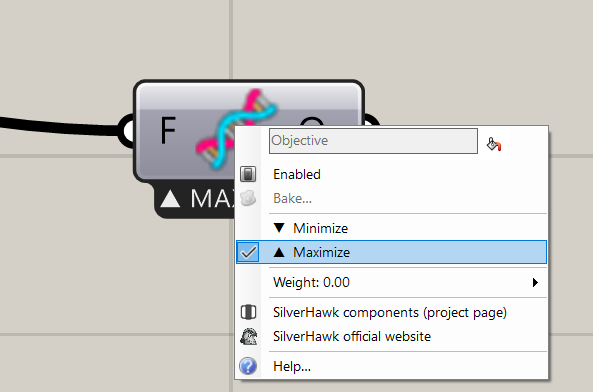
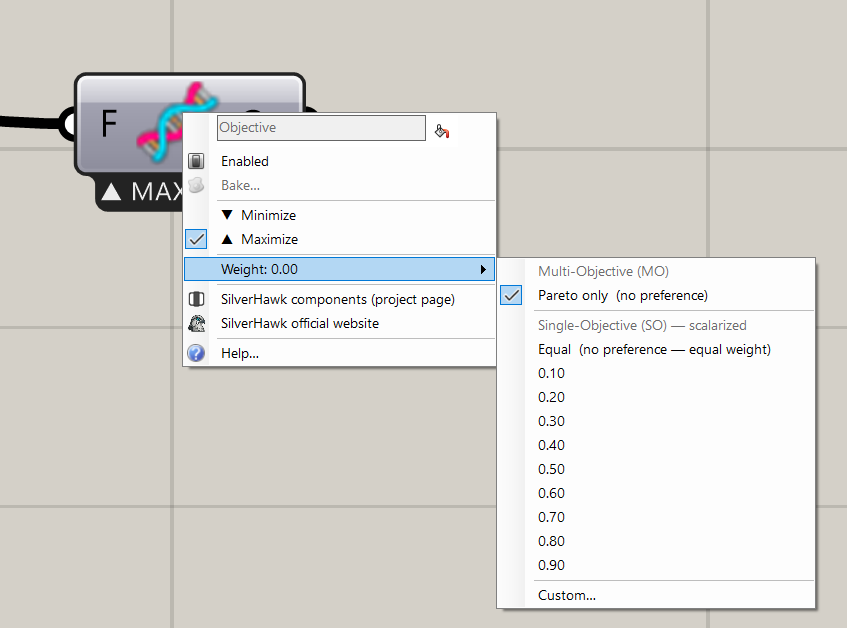
The Weight Submenu & Problem Types
Right-clicking SH_Objective provides the Weight submenu, which distinguishes two operational modes:
- Pareto Only (Weight 0): Requests a true multi-objective (MO) Pareto run without preference. Solutions are evaluated via non-dominated sorting and hypervolume expansion.
- Equal or Numeric Weight (
, or Custom): Requests a scalarized single-objective (SO) run where multiple objectives are normalized and combined as a weighted sum. With a single objective, weights are not used.
Problem Type Determination Matrix
| Number of Objectives | Weights Assigned | Resulting Problem Type |
|---|---|---|
| 1 | Not used | SO (Single-Objective) |
| 2 or more | All 0 (Pareto only) | MO (Multi-Objective Pareto Front) |
| 2 or more | At least one weight | SO (Weighted Scalarization) |
In the scalarized case, objectives are normalized and combined by weight; the raw per-objective metrics of the best solution remain available at the solver's Bo output.
Comparing with Tools that Only Minimize
Some optimization tools minimize every objective and require maximization to be expressed by negation. When a SilverHawk result is compared with such tools, maximized objectives must be negated on the other side:
- For example, in the ADO benchmark, with
SH_Objectiveset to MAX, the positive Daylight Factor () is used directly. - In a minimize-only tool, the objective must be entered as
(that is, ). - Hypervolume values are only comparable once both sets of results are expressed in the exact same mathematical convention.
TWO COMMON MISTAKES TO AVOID
- Leaving global direction on Minimize while an objective such as
is meant to be maximized, which yields a Pareto front of the worst possible designs for that metric. - Negating an objective on the canvas (
) AND declaring it MAX, which cancels out and again optimizes in the wrong direction.